1. Introduction: The AI Revolution in HR
Artificial intelligence is fundamentally transforming human resources management. What began as simple automation of repetitive tasks has evolved into sophisticated systems that predict workforce trends, provide instant employee support, and surface early risk signals that would be invisible to traditional HR analytics.
According to Gartner's 2026 HR Priorities Report, 76% of HR leaders believe they must adopt AI and automation technologies in the next 12-24 months to remain competitive. The shift from reactive to proactive HR enabled by AI is no longer optional for enterprise organizations.
This comprehensive guide explores how AI is reshaping HR operations, from employee self-service chatbots to predictive workforce analytics. We'll cover technical architecture (including RAG systems), ERP integrations with platforms like Workday and SAP, security considerations, ROI measurement, and practical implementation strategies.
Why AI Matters for HR Leaders Now
The traditional HR operating model where teams spend 60-70% of their time answering routine questions and processing transactional requests is unsustainable at enterprise scale. As organizations grow, HR headcount doesn't scale proportionally. AI fills this gap by:
- Deflecting routine inquiries: 70-80% of employee questions (PTO balance, benefits enrollment, policy clarification) can be answered instantly by AI without HR intervention
- Surfacing strategic insights: AI analyzes interaction patterns to detect policy confusion, manager effectiveness issues, and early attrition signals
- Enabling personalized experiences: Each employee gets instant, contextual answers based on their actual ERP data (role, location, tenure, benefits elections)
- Reducing compliance risk: Consistent, auditable responses reduce the likelihood of misinformation or policy misapplication
2. How RAG Works for HR Systems
RAG (Retrieval-Augmented Generation) is the architectural pattern that makes AI HR assistants both accurate and grounded in your actual company data. Unlike generic chatbots that rely solely on pre-trained knowledge, RAG systems retrieve real information from your systems before generating responses.
The RAG Architecture
When an employee asks a question, the RAG system executes a three-step process:
Step 1: Intent Classification
The system classifies the employee's question into a domain (benefits, PTO, policy, org structure, etc.) and determines which data sources to query. For example:
- "What's my PTO balance?" → Query Workday Time Off API
- "What's the parental leave policy?" → Retrieve policy document from vector store
- "Who is my skip-level manager?" → Query org structure endpoint in ERP
Step 2: Information Retrieval
The system fetches relevant data from multiple sources:
- ERP APIs: Live data from Workday, SAP, or other HR systems (employee records, PTO, compensation, benefits)
- Vector Database: Company policies, handbooks, FAQs converted to embeddings for semantic search
- Structured Documents: Benefits guides, enrollment forms, org charts
This retrieval happens in real-time the system never stores employee PII permanently. It queries, uses, and discards data within seconds.
Step 3: Contextualized Generation
The AI uses retrieved information to generate a personalized, accurate response. The prompt includes:
- The employee's original question
- Retrieved data (e.g., PTO balance: 12 days available, company policy excerpt)
- Guardrails (don't speculate, cite sources, escalate if uncertain)
The result is a response that's both conversational and factually grounded. For instance:
AI Response: "Yes! According to the PTO Rollover Policy (Section 4.2), you can roll over up to 5 days of unused PTO into the next calendar year. Any days beyond that are forfeited unless you request an exception through your manager. You currently have 12 days available, so if you don't use 7 days by December 31, you'll lose them."
Why RAG Prevents AI Hallucinations
Generic large language models (LLMs) are prone to "hallucination" confidently generating plausible but incorrect information. RAG solves this by anchoring every response in actual retrieved data. If the system can't find relevant information, it admits uncertainty rather than guessing.
According to Deloitte's Generative AI in Enterprise report, RAG architectures reduce hallucination rates by 85-90% compared to standalone LLMs in enterprise use cases.
3. AI HR Chatbots and Employee Self-Service
AI HR chatbots are the most visible manifestation of HR AI. Employees interact with them through Slack, Microsoft Teams, web portals, or dedicated apps. Behind the simple chat interface lies sophisticated orchestration of ERP APIs, policy search, and personalized response generation.
Core Use Cases
PTO and Time Off Management
Employees can ask:
- "What's my PTO balance?" → Real-time query to Workday or ADP
- "How do I request time off?" → Policy guidance + link to self-service portal
- "Can I take 3 weeks off in July?" → Balance check + blackout date verification
- "What happens to unused PTO?" → Rollover policy explanation
Impact: PTO-related questions represent 30-40% of routine HR inquiries. Automating these frees 10-15 hours per week for a mid-sized HR team.
Benefits and Enrollment
Benefits questions spike during open enrollment but occur year-round:
- "What health insurance plans do I have?" → ERP lookup of current elections
- "How much do I pay for dental?" → Benefits cost breakdown from payroll system
- "Can I change my 401(k) contribution mid-year?" → Policy check + procedure guidance
- "What's covered under FSA?" → Benefits guide retrieval with IRS rules
During open enrollment, chatbots handle 70-80% of routine benefits questions, allowing HR teams to focus on complex cases (life events, qualifying status changes, etc.).
Policy and Compliance
Policy-related questions are high-stakes incorrect answers can create compliance risk. AI chatbots retrieve exact policy language and cite sources:
- "What's the remote work policy?" → Policy document retrieval + manager approval requirements
- "Can I work from another state?" → Tax/compliance implications + HR contact for complex cases
- "What's the parental leave policy?" → Policy details + eligibility requirements + application process
Compliance Note: Enterprise chatbots should include audit logs showing which policy version was cited for each response, ensuring traceability if policies change or disputes arise.
Org Structure and Contacts
Employees frequently need to navigate organizational hierarchies:
- "Who is my manager?" → ERP org chart lookup
- "Who runs the Denver office?" → Location-based org structure query
- "How do I contact HR?" → Contextual routing (payroll vs. benefits vs. general HR)

Example: AI HR chatbot providing instant answers to employee questions with data from ERP systems
Chatbot Deployment Models
Embedded in Collaboration Tools
Most enterprise chatbots deploy directly into Slack or Microsoft Teams:
- Pros: Employees don't need to learn a new tool; meets them where they work; supports conversational follow-ups
- Cons: Requires OAuth integration; must handle noisy input (typos, slang, incomplete questions)
Standalone Web Portals
Some organizations prefer dedicated HR chatbot portals:
- Pros: Controlled branding; richer UI (buttons, forms, data tables); easier to track adoption metrics
- Cons: Lower discoverability; employees must remember to visit the portal
Mobile Apps
For deskless workers (retail, manufacturing, healthcare), mobile-first chatbots are critical:
- Pros: Accessibility for non-desk employees; supports push notifications for reminders
- Cons: Requires mobile app development; must optimize for smaller screens
4. Workforce Intelligence and Predictive Analytics
While chatbots deliver immediate value through employee self-service, the strategic opportunity lies in workforce intelligence using AI to surface patterns, predict outcomes, and recommend proactive interventions.
What is Workforce Intelligence?
Workforce intelligence analyzes interaction data, ERP records, and behavioral signals to answer strategic questions:
- Policy Effectiveness: Which policies generate the most confusion? Which teams struggle with compliance?
- Manager Quality: Which managers escalate more questions to HR? Are certain teams over-dependent on manager approval?
- Attrition Risk: Do employees who ask about "remote work policy" or "tuition reimbursement" show higher turnover risk?
- Benefits Optimization: Which benefits generate the most questions? Are there gaps in employee understanding during open enrollment?
Traditional HR analytics rely on surveys or exit interviews lagging indicators that surface problems after they've materialized. Workforce intelligence uses real-time interaction data to detect early signals.
Key Intelligence Metrics
Policy Clarity Score
Measures how often employees ask clarifying questions about a specific policy. A low clarity score indicates the policy is confusing or incomplete.
Example: If 40% of "remote work policy" queries require HR escalation (the chatbot can't answer definitively), that policy needs revision.
Manager Effectiveness Index
Tracks how often employees bypass their manager to ask HR questions directly. High bypass rates may indicate:
- Manager lacks knowledge of HR policies
- Employees don't trust manager to handle sensitive topics
- Manager is unavailable or unresponsive
Attrition Prediction Signals
Certain query patterns correlate with turnover risk:
- Sudden increase in policy-related questions (testing boundaries)
- Questions about benefits portability or COBRA continuation
- Queries about stock option vesting schedules
While not definitive, these signals allow HR to proactively reach out for retention conversations.
Benefits Engagement
Tracks which benefits employees ask about most vs. which they actually use. Gaps between inquiry volume and utilization reveal communication failures or benefit design flaws.
Real-Time Workforce Intelligence Dashboards

HR Intelligence Dashboard: Cost savings, ticket deflection rates, and strategic insights at a glance
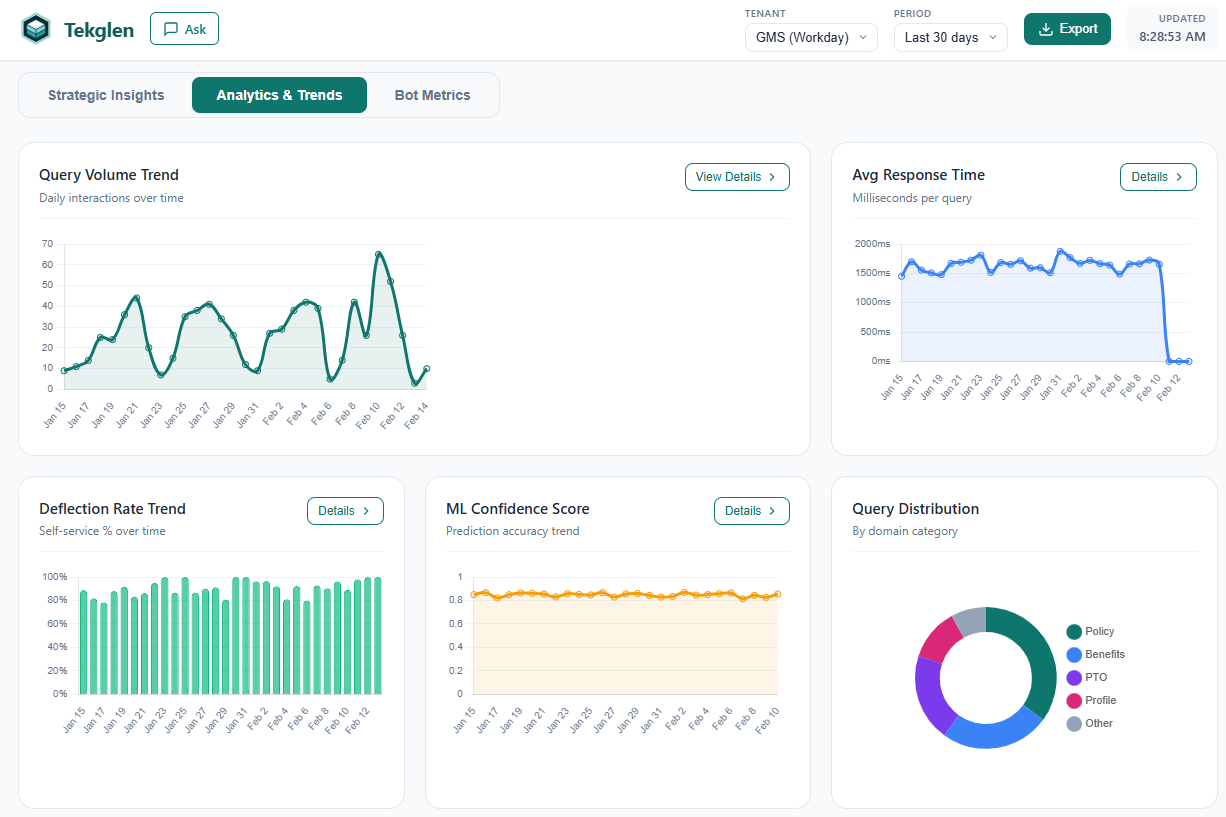
Workforce trends: Query volumes, seasonal patterns, and policy confusion signals
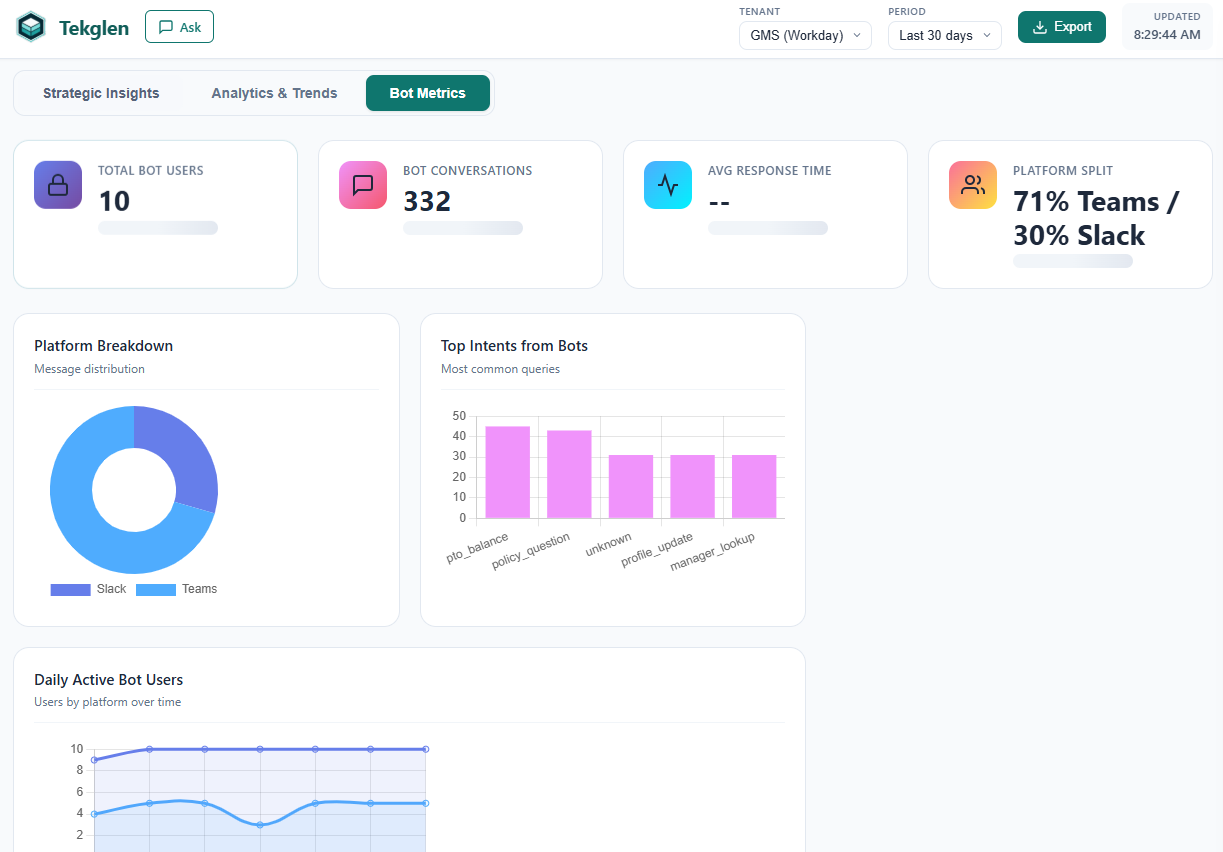
Bot performance metrics: Response accuracy, resolution rates, and user satisfaction
Predictive vs. Descriptive Analytics
Traditional HR dashboards show descriptive analytics what happened (headcount, turnover rate, time-to-hire). Workforce intelligence adds predictive analytics what's likely to happen next.
For example:
- Descriptive: "Turnover in the engineering org is 18% this year."
- Predictive: "Based on inquiry patterns and tenure data, we predict 12 engineers (8% of the team) are at high flight risk in Q2. Focus retention efforts on the backend team (highest risk cluster)."
5. ERP Integrations (Workday, SAP, ADP, UKG, BambooHR)
AI HR platforms are only as good as the data they access. To provide personalized, accurate responses, they must integrate deeply with your ERP or HRIS. This section covers integration strategies for the five most common enterprise HR systems.
Workday Integration
Workday dominates enterprise HCM for organizations with 1,000+ employees. Integration options:
Workday RaaS (Reports-as-a-Service)
RaaS exposes Workday reports as REST APIs:
- Use case: Bulk data sync (employee roster, org structure, PTO balances)
- Pros: Flexible report design; supports complex filters and joins
- Cons: Reports must be pre-configured in Workday; not real-time (typically cached)
Workday REST API
Workday's native REST APIs support granular, real-time queries:
- Use case: Real-time lookups (individual employee PTO balance, current benefits elections)
- Pros: Real-time data; fine-grained access control
- Cons: Requires OAuth 2.0 setup; API rate limits
Authentication
Workday supports OAuth 2.0 with JWT bearer tokens. Best practice: create an Integration System User (ISU) with minimal required permissions (read-only access to worker data, time off, benefits).
SAP SuccessFactors Integration
SAP SuccessFactors is common in manufacturing, retail, and global enterprises. Integration approaches:
OData API
SuccessFactors exposes most entities (Employee Central, Time Off, Compensation) via OData protocol:
- Use case: Employee profile, org structure, compensation data
- Pros: Standardized OData format; supports filters and pagination
- Cons: Complex authentication (OAuth + SAML); verbose XML responses
Compound Employee API
A higher-level API that retrieves comprehensive employee data in a single call:
- Use case: Fetching full employee profile (personal info, job, compensation, time off)
- Pros: Reduces API call volume; simplified data model
- Cons: Less granular control; may over-fetch data
ADP Workforce Now Integration
ADP is popular in mid-market US organizations. Integration options:
ADP Marketplace API
ADP's official API for third-party integrations:
- Use case: Worker demographics, payroll, time & attendance
- Pros: Well-documented; OAuth 2.0 support
- Cons: Requires ADP Marketplace partnership (certification process)
UKG Pro Integration
UKG Pro (formerly UltiPro) serves mid-to-large enterprises. Integration strategy:
UKG Pro REST API
Covers employee data, time off, benefits, and payroll:
- Use case: Employee profiles, PTO accruals, org hierarchy
- Pros: RESTful design; supports OAuth
- Cons: API documentation can be sparse; versioning inconsistencies
BambooHR Integration
BambooHR is the leading HRIS for small-to-mid-market companies (50-1,000 employees). Integration:
BambooHR API
Simple REST API with basic authentication:
- Use case: Employee directory, PTO, custom fields
- Pros: Easy to integrate; well-documented; generous rate limits
- Cons: Less feature-rich than enterprise ERPs; no complex reporting
Multi-ERP Strategy
Large enterprises often run multiple ERPs across regions or business units (e.g., Workday in North America, SAP in EMEA). AI HR platforms must:
- Normalize data models: Map different ERP schemas to a unified internal model
- Handle authentication separately: Each ERP requires distinct OAuth credentials and refresh token management
- Route queries intelligently: Determine which ERP to query based on employee location or business unit
6. Security, Compliance, and Data Privacy
HR systems handle the most sensitive category of enterprise data: personally identifiable information (PII) including Social Security numbers, salaries, health information, and performance reviews. AI platforms accessing this data must implement enterprise-grade security.
Authentication and Authorization
OAuth 2.0 for ERP Access
All ERP integrations should use OAuth 2.0 with scoped access tokens:
- Principle of least privilege: Request only the scopes required (e.g., read-only access to worker data and time off)
- Short-lived tokens: Access tokens should expire within 1 hour; use refresh tokens to obtain new access tokens
- Token storage: Encrypt tokens at rest using AES-256
Employee Authentication
When employees interact with the chatbot, authenticate them using:
- SSO (Single Sign-On): Integrate with Okta, Azure AD, or OneLogin to inherit enterprise identity
- RBAC (Role-Based Access Control): Restrict access based on employee role (e.g., managers can query their team's data; employees only see their own)
Data Encryption
In Transit
All API calls must use TLS 1.3 (or TLS 1.2 minimum). This includes:
- Employee browser → AI platform (HTTPS)
- AI platform → ERP APIs (HTTPS with certificate pinning recommended)
- AI platform → LLM provider (e.g., OpenAI API)
At Rest
If you cache any data (e.g., policy documents, org structure), encrypt it using AES-256. Use envelope encryption: data encryption keys (DEKs) are themselves encrypted by a master key encryption key (KEK) stored in a hardware security module (HSM) or cloud KMS.
Audit Logging
Every interaction should generate an immutable audit log:
- Timestamp (UTC)
- Employee ID (who asked)
- Intent classification (what type of question)
- Data sources accessed (which ERP records were queried)
- Response provided (sanitized version for compliance review)
- IP address and user agent
Zero Persistent Storage
Enterprise AI HR platforms should not replicate your ERP database. Instead, they query data in real-time and discard it after generating a response. This "zero persistent storage" architecture minimizes data breach risk and simplifies compliance.
Compliance Frameworks
AI HR platforms must support:
- SOC 2 Type II: Annual third-party audits of security controls, data handling, and availability
- GDPR Compliance: Data portability, right to erasure, consent management for EU employees
- HIPAA (if applicable): For organizations where the AI handles Protected Health Information (PHI)
- CCPA/CPRA: California privacy rights for employee data access and deletion
7. Measuring ROI and Success Metrics
AI HR investments must demonstrate measurable value. The key is tracking both efficiency metrics (time/cost savings) and experience metrics (employee and HR satisfaction).
Core Metrics to Track
Deflection Rate
Definition: Percentage of employee queries resolved by AI without HR intervention
Target: 70-80% for mature deployments
Measurement: Track queries that result in "escalated to HR" vs. "resolved by chatbot"
A 75% deflection rate means for every 100 employee questions, 75 are handled entirely by AI and 25 require human follow-up.
Cost Savings (HR Time Reclaimed)
Formula: (Queries deflected per month) × (Average time per query) × (Hourly HR cost)
Example: 1,200 queries/month deflected × 10 minutes per query × $40/hour = $8,000/month saved
Over 12 months, that's $96,000 in reclaimed HR capacity that can be redeployed to strategic work.
Response Time
Baseline: Email or ticket-based HR support typically takes 24-48 hours
AI-Powered: Instant response (2-5 seconds)
Impact: 80-90% reduction in time-to-resolution
Employee Satisfaction (ESAT)
Measure employee satisfaction with HR support before and after AI deployment:
- ESAT score (1-5 scale) after each chatbot interaction
- NPS (Net Promoter Score) for HR services overall
- Reduction in "frustrated" escalations (employees who couldn't find answers and opened tickets in frustration)
Adoption Rate
Definition: Percentage of employees who have used the AI assistant at least once
Target: 60-70% within 6 months (for Slack/Teams deployments)
Leading indicator: Track weekly active users (WAU) and monthly active users (MAU)
Advanced ROI Metrics
Strategic Capacity Unlocked
Beyond cost savings, measure how reclaimed HR time is redeployed:
- Hours spent on workforce planning (vs. transactional support)
- Proactive retention conversations initiated
- Manager training programs launched
Policy Improvement Cycle Time
Workforce intelligence reveals policy gaps faster. Measure:
- Time from "policy confusion detected" to "policy revised and communicated"
- Reduction in repeat policy questions after clarification
Compliance Risk Reduction
Track:
- Incidents of incorrect HR guidance (pre vs. post AI)
- Audit log completeness (ability to prove compliance during audits)
8. HR Automation and Efficiency Gains
Beyond answering questions, AI HR platforms can automate end-to-end workflows reducing manual processes, eliminating handoffs, and accelerating cycle times.
Workflow Automation Examples
PTO Request Processing
Manual Process:
- Employee emails manager requesting PTO
- Manager checks team calendar, asks HR about blackout dates
- HR verifies PTO balance in ERP
- Manager approves via email
- HR manually enters PTO into system
AI-Automated Process:
- Employee asks chatbot: "Can I take PTO July 10-14?"
- Chatbot checks PTO balance, blackout dates, and team coverage
- Routes approval to manager via Slack with one-click approve/deny
- On approval, automatically creates PTO entry in ERP
- Sends calendar invite and confirmation to employee
Time savings: Process that took 2-3 days reduces to 2-3 hours.
Benefits Enrollment Guidance
Manual Process:
- HR sends generic benefits guide to all employees
- Employees submit questions via email/ticket
- HR responds individually (high volume during open enrollment)
- Employees make elections in benefits portal
AI-Automated Process:
- Chatbot proactively messages employees: "Open enrollment starts Monday. Want help comparing plans?"
- Walks employee through personalized decision tree based on dependents, health needs, risk tolerance
- Recommends optimal plan combination with cost breakdown
- Links directly to enrollment portal with pre-selected options
Impact: 40-50% reduction in benefits-related HR inquiries during open enrollment.
Onboarding Workflow
Manual Process:
- HR sends new hire packet via email
- New hire completes I-9, W-4, direct deposit forms manually
- HR chases down missing forms via email
- IT separately provisions laptop and accounts
- Manager schedules orientation meetings
AI-Automated Process:
- Chatbot greets new hire on Day 1: "Welcome! Let's complete your onboarding."
- Guides through digital I-9 verification (OCR-scans documents)
- Collects W-4 and direct deposit via secure form
- Triggers IT provisioning workflow automatically
- Schedules orientation meetings based on manager calendar availability
- Answers "where's the cafeteria?" and "how do I submit expenses?" questions in real-time
Time savings: HR onboarding time per new hire drops from 4-5 hours to 30-45 minutes.
When to Automate vs. Escalate
Not every HR process should be fully automated. Use this framework:
- Automate: High-volume, low-complexity, rule-based tasks (PTO lookups, policy FAQs, simple approvals)
- Augment: Medium-complexity tasks where AI assists but human makes final decision (benefits selection, performance review scheduling)
- Escalate: High-stakes, sensitive, or legally complex matters (terminations, harassment complaints, accommodation requests)
9. The Future of AI in HR
The AI capabilities available today are just the beginning. Here's what's on the horizon for AI-powered HR:
Hyper-Personalization
Future AI HR systems will tailor every interaction based on:
- Communication style: Adjust tone and detail level based on employee preferences (concise vs. verbose, formal vs. casual)
- Learning history: Avoid re-explaining concepts the employee already understands
- Life events: Proactively surface relevant information (new parent → parental leave policy; new homebuyer → commuter benefits)
Proactive Recommendations
Instead of waiting for employees to ask questions, AI will proactively recommend actions:
- "You have 8 unused PTO days. Consider taking time off before year-end."
- "Based on your age and income, you're not maximizing your 401(k) match. Consider increasing contribution to 6%."
- "Your manager hasn't scheduled a 1:1 with you in 6 weeks. Would you like me to suggest one?"
Skills-Based Workforce Planning
AI will analyze job postings, project assignments, and learning activity to:
- Identify skill gaps before they become critical
- Recommend internal mobility opportunities based on transferable skills
- Predict future skill demand and trigger proactive upskilling programs
Sentiment Analysis and Wellbeing
By analyzing interaction patterns (not content privacy preserved), AI can detect:
- Teams showing signs of burnout (increased policy questions, PTO requests)
- Managers under stress (high escalation rates, delayed responses)
- Organizational areas with low psychological safety (employees avoiding certain topics)
Regulatory Compliance Automation
As employment law evolves (e.g., pay transparency laws, AI hiring regulations), AI systems will:
- Automatically update policy guidance to reflect new regulations
- Flag non-compliant processes (e.g., job postings missing required salary ranges)
- Generate compliance reports for audits
10. Frequently Asked Questions
What is AI in HR and why does it matter?
AI in HR refers to machine learning, natural language processing, and automation technologies that transform how organizations manage their workforce. This includes AI chatbots for employee self-service, predictive analytics for workforce planning, intelligent document processing for recruitment, and risk detection systems. According to Gartner, 76% of HR leaders believe they must adopt AI in the next 12-24 months to remain competitive.
What is RAG and how does it work in HR systems?
RAG (Retrieval-Augmented Generation) combines information retrieval with AI text generation. In HR, RAG systems first search your company's HR data (policies, ERP records, benefits documents) to find relevant information, then use that context to generate accurate, personalized answers. This prevents AI hallucinations and ensures responses are grounded in your actual company data rather than generic information.
How secure are AI HR systems with sensitive employee data?
Enterprise AI HR platforms implement multi-layered security including OAuth 2.0 authentication, role-based access control (RBAC), end-to-end encryption for data in transit and at rest, comprehensive audit logging, and SOC 2 Type II compliance. Secure systems never store employee data permanently queries are processed in real-time from your ERP using minimal permission scopes.
What ROI can organizations expect from HR AI implementation?
Organizations typically see 60-75% reduction in routine HR tickets, 80% faster response times for employee inquiries, 15-20 hours per week saved for HR teams, and improved employee satisfaction scores. Cost savings average $150,000-$300,000 annually for mid-sized enterprises (1,000-5,000 employees) based on deflected ticket volume and reduced HR operational costs.
Which ERP systems integrate with AI HR platforms?
Leading AI HR platforms integrate natively with Workday, SAP SuccessFactors, ADP Workforce Now, UKG Pro, Oracle HCM Cloud, and BambooHR. These integrations use secure APIs to pull live employee data, org structures, PTO balances, benefits, and compensation information without data duplication or synchronization delays.
See Tekglen's AI HR Platform in Action
Try our live demo with real Workday data integration, or contact us to discuss how Tekglen can transform your HR operations.
Request a Demo